
We are pleased to announce the beta release of Echoview 17
Drawing on the expertise of our scientists, software developers, quality assurance specialists, and support team, Echoview 17 beta introduces powerful new capabilities including: expanded time series functionality, new data file format support, improved detection workflows, and enhanced automation tools designed to help you generate deeper insights from your active acoustic data.
We invite you to be among the first to explore what’s new and help us evaluate this release. As with all beta releases, this version is provided for testing purposes only. We welcome your feedback on usability, functionality, and any issues you encounter at support@echoview.com. Because beta software may contain unexpected issues or calculation errors, we recommend against using it for critical data processing tasks.
Echoview 17 beta is available to users with licensed access to Echoview 16. The final release will be available to users with an active MATS plan. If you would like to confirm your license status, please contact info@echoview.com.
See below for a closer look at what’s new in Echoview 17 beta, then download the release and try these new capabilities for yourself.
New data support and processing tools
Echoview 17 introduces new file format support and improved processing capabilities including:
- Support for Tritech Gemini (*.glf) imaging sonar files.
- Improved Kongsberg EK80 passive data handling.
- Expanded text based file (CSV) workflow support including Unspecified dB CSV support, and allowing mixed data types to be added to a single fileset.
- A frequency exclusion option in the Wideband Frequency Subset operator, and improved Wideband Frequency Response calculations.
- Multibeam data support for the Crop Samples operator.
- Enhanced Boolean data support for the XxY and XxYxZ Statistic operators, as well as Resample operators (by Distance Interval, Number of Pings, and Time Interval).
- A Remove Duplicate Positions operator for ignoring unnecessary duplicate GPS fixes.
- New Add Folder functionality simplifies importing data stored in complex directory structures.
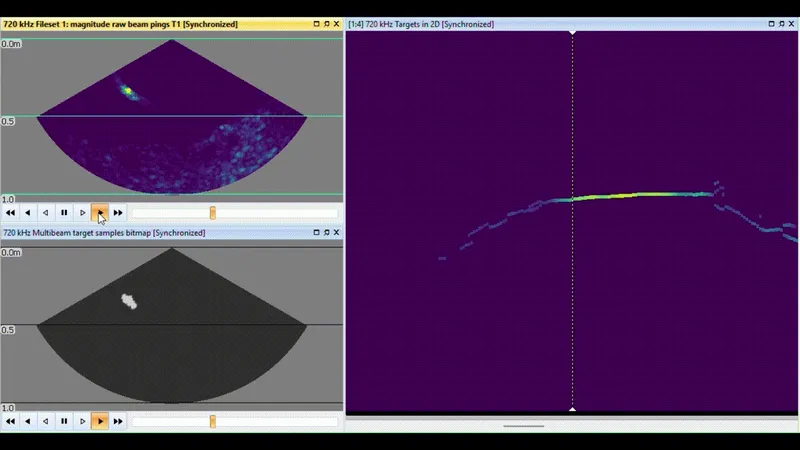
The image shows Tritech raw data displayed in the top left panel, while the bottom left and right panels show the results of Echoview’s built-in algorithms, which can be used to delineate and track fish over time.
Read more about these changes in the sneak peek article here.
Time series: more ways to add context
New time series capabilities make it easier to integrate environmental and operational context into your analyses.
- Display time series directly on echograms for improved contextual analysis.
- Compare multiple time series on a single graph.
- New Solar Elevation operator for biologically meaningful time-of-day analysis.
- Create and process custom time series using the new Code - Time Series operator, or convert data using the Type Conversion - Time Series operator.
- Apply existing line operators to time series data for more flexible processing.
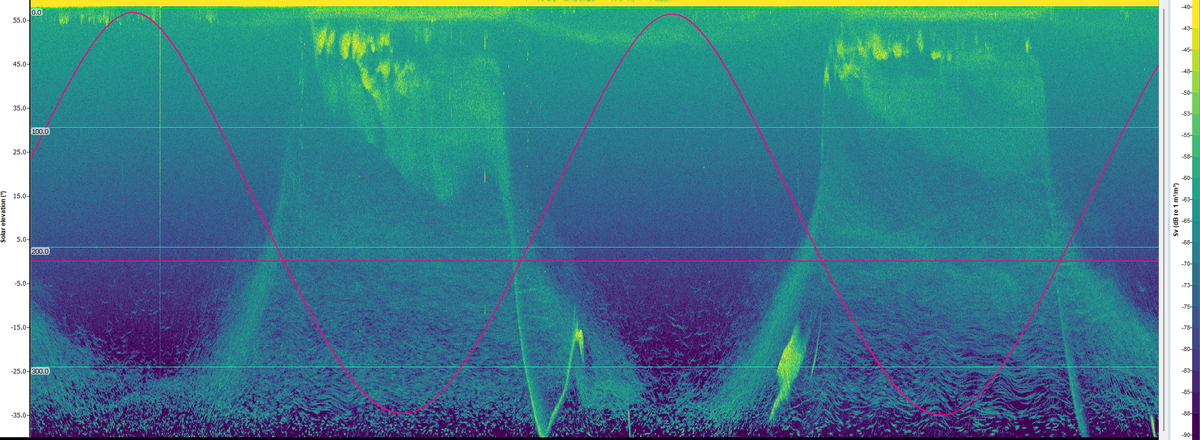
In this example, Solar Elevation data has been overlaid on Nortek Signature 100 data to provide context for observed diel vertical migration patterns. The horizontal pink line marks 0° solar elevation, allowing day and night conditions to be identified at a glance.
Read more about expanded time series features here.
Detection, Dataflow and windows
Echoview 17 introduces workflow improvements designed to make detection processing easier to manage.
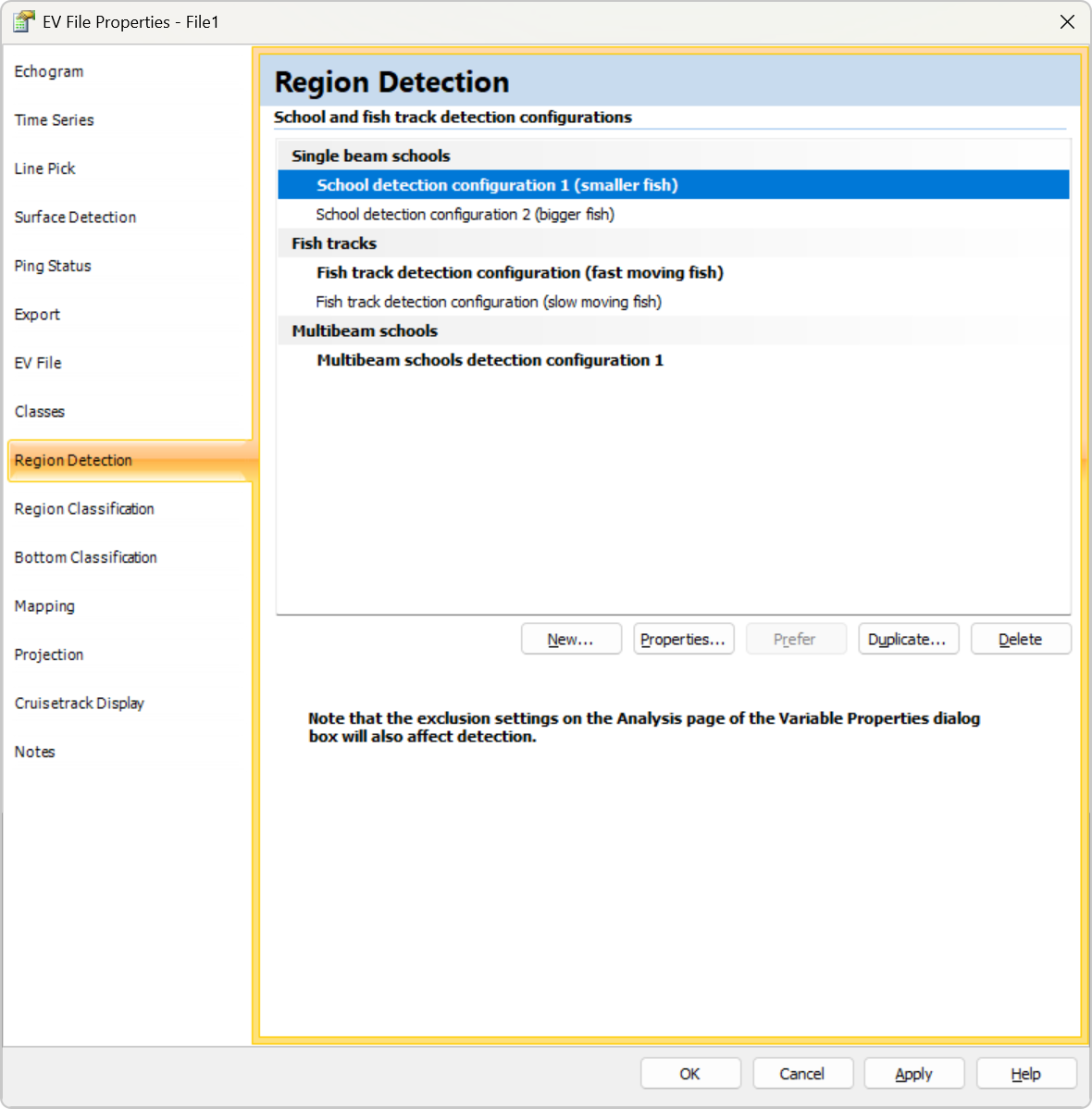
- Multiple region detection configurations can now be defined for single beam and multibeam school detection and fish tracking.
- Detection settings are managed from the new Region Detection page in EV File Properties, replacing the previous Schools and Fish Tracks pages (see example below).
Improved Dataflow window:
- The Dataflow Toolbox is now docked within the Dataflow window.
- Objects now snap to an invisible grid as they are moved, helping to keep large processing workflows aligned and readable.
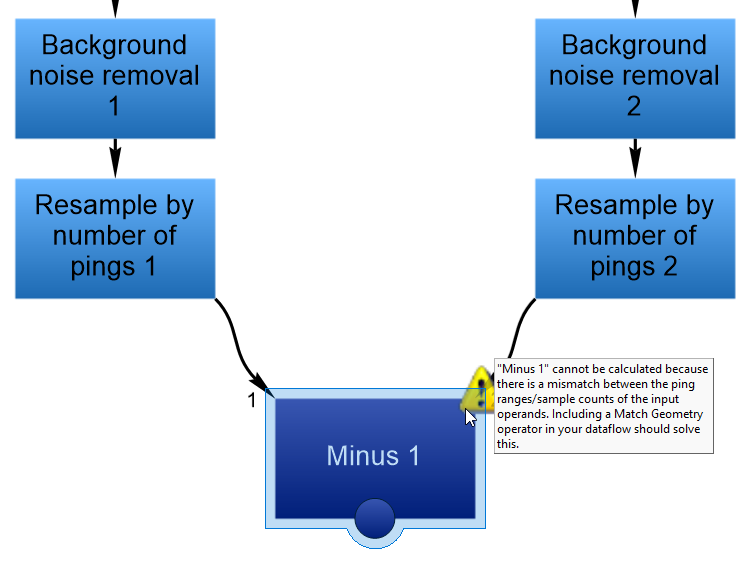
- New visual warning icons make it easier to identify variables that require attention.
- Improvements in copying of property names for dynamic naming.
New Code operators, automation, and more
Several enhancements provide users with greater flexibility for custom workflows, automation and data analysis.
- New Code operator Arguments property for reusable and configurable Python workflows.
- COM access to the ECS calibration and Python file location lists in EV File Properties, as well as a MeasurementCount property for time series variables.
- Enhanced command interface compatibility with support for deprecated property names, plus improvements to scripting log handling.
- Export and analysis enhancements, including ECS filename export.
- Sample Analysis exporter (previously Sv Integration) and Interval Analysis now support non-Sv data types as input, extending familiar calculations to a broader range of measurements.
See the sneak peek on new Dataflow tools here.
Other enhancements
Additional enhancements include new options for resetting EV file and application window layouts, support for storing EVI files in custom locations, and numerous interface, stability and workflow refinements.
Feedback
We welcome your feedback on the Echoview 17 beta. If you have comments, questions, or encounter any issues while testing, please contact support@echoview.com.
Download Echoview 17 beta
Echoview 17 beta can be downloaded from the Latest version of Echoview page.