
Echoview 17: More powerful, flexible and connected hydroacoustic analysis
Echoview Software has launched Echoview 17, the latest release of its flagship software for processing, visualizing, and analyzing active acoustic data.
Used in more than 70 countries, Echoview helps researchers, consultants, government agencies, industry, and environmental organizations process and interpret active acoustic data for water column research applications ranging from fisheries assessment and habitat mapping to ecosystem monitoring and behavioral studies.
Echoview 17, released in September 2026, expands compatibility with a broader range of data sources, while delivering significant enhancements to data processing, analysis, detection, automation, and workspace management. Together, these improvements help users work more efficiently and extract greater value from their data.
Echoview Software’s Chief Scientist, Briony Hutton, said, “One of the best parts of working at Echoview is seeing the diverse ways that people apply active acoustics to real-world problems. As data volumes grow and new sensors emerge, our community continues to push the boundaries of what's possible. Echoview 17 reflects those conversations and challenges, and I'm excited to see what our users do with it.”
Key highlights of Echoview 17
Expanded support for Tritech Gemini and other formats
Echoview 17 introduces support for Tritech Gemini (*.glf) files, adding another widely used imaging sonar format to Echoview’s extensive range of supported technologies. Compatibility with other acoustic and ancillary data has also been extended, allowing researchers to bring more of their existing datasets into a consistent analysis workflow.
For Kongsberg EK80 data, passive data can now be separated automatically from active pings recorded by the same transducer, while clearer variable names make different ping modes, data types, and sequencing configurations easier to identify and manage.
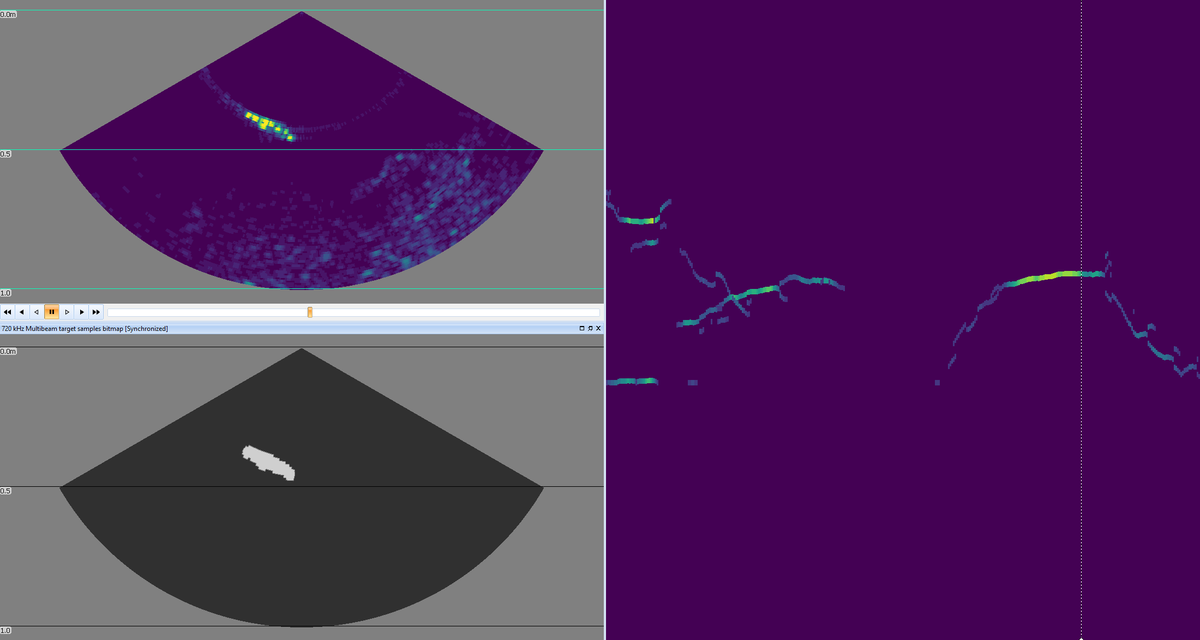
Tritech raw data is displayed in the top left panel, while the bottom left and right panels show the results of Echoview’s built-in algorithms that can be used to delineate and track targets over time.
Advanced time series capabilities
Echoview 17 significantly expands its Time series capabilities, helping researchers examine acoustic observations alongside environmental measurements, platform information, derived metrics, and other contextual data. Time series can be overlaid on echograms or compared in a single graph, making relationships between acoustic and supporting datasets easier to identify. New operators provide additional ways to generate and process Time series data. For example, the Solar elevation at pings operator allows researchers to examine acoustic observations in relation to daylight and investigate patterns such as diel vertical migration. Together with expanded processing options, these additions support more flexible analysis of relationships between acoustic and environmental data.
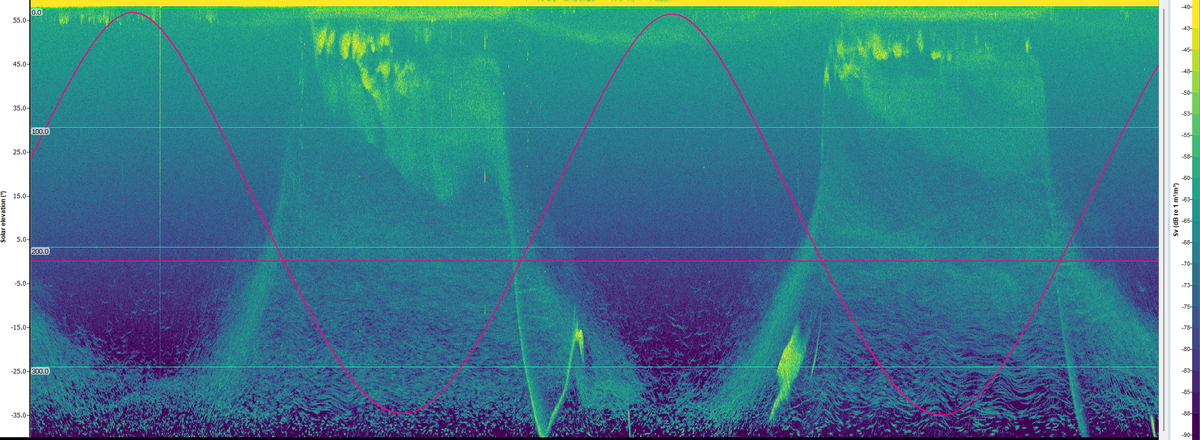
Solar elevation data (oscillating pink line) overlaid on Nortek Signature 100 data, providing context for diel vertical migration patterns in backscatter. The horizontal line marks 0° solar elevation, allowing day (above the line) and night (below the line) to be quickly confirmed.
Improved Dataflow and workspace management
Echoview 17 provides a more streamlined environment for building and managing processing workflows. An integrated Dataflow Toolbox, object grid snapping, and visual warnings make complex Dataflows easier to organize and troubleshoot. Enhanced window and layout controls help users configure their workspace for different projects and working styles.
Multiple detection configurations
Echoview 17 makes it easier to develop and compare alternative approaches to single beam and multibeam school and fish track detection. Users can create and manage multiple configurations in one place, helping them test different settings, compare their effects, and select an approach suited to their data and research objectives.
More flexible analysis workflows
Echoview 17 extends established analysis tools and exporters to a broader range of acoustic measurements, giving researchers more flexibility to work with different data types through familiar workflows. Interval Analysis operators can now work with additional data types, including power, TS, linear and unspecified dB, allowing analysis methods to be applied more broadly. Analysis exports can also include the ECS filename, making it easier to identify the calibration file used when reviewing and reporting results.
For more information on Echoview 17, please visit our latest release page or reach out to our team via email: info@echoview.com.