Echoview 16.1: Built on your feedback, designed for efficiency
Our latest update delivers a set of targeted enhancements designed to improve your everyday hydroacoustic data processing.
Available as a free upgrade for all licensed Echoview 16 users, this update introduces expanded file format support alongside practical improvements to workflows and usability.
Shaped by user-requested enhancements and ongoing engagement with the hydroacoustics community, Echoview 16.1 reflects our commitment to continuous improvement, making it even easier to transform raw echosounder and sonar data into actionable insights.
Developed with the expertise of our team, these updates focus on streamlining common tasks and making our software more intuitive to use.
Key highlights: expanded support
Blueprint Subsea Oculus V2 format data files
Introducing support for the Blueprint Subsea Oculus V2 data file format, removing the need to first convert data to the legacy (V1) format. Additional metadata is also read from these files and reported, including gamma control, beam control, gain control, gain assist, gain boost, and pressure sensor values.
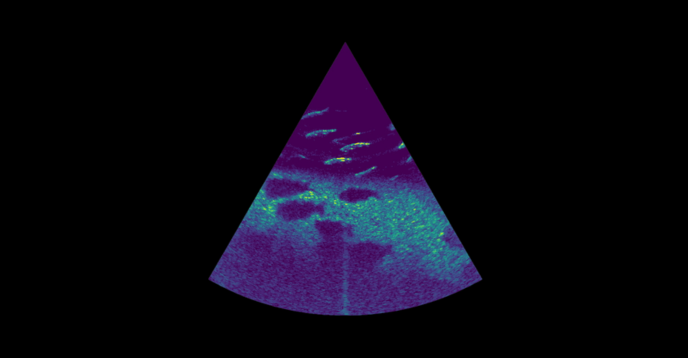
Oculus imaging sonar data kindly shared by Blueprint Subsea.
Support for the latest AZFP file format from ASL Environmental Services
Echoview now supports new generation AZFP raw data files. The sixth-generation instruments have the capability of being configured as an Acoustic Zooplankton Fish Profiler (AZFP6), Ice Profiling Sonar (IPS6) or Shallow Water Ice Profiler (SWIP6). Their *.aps6 files are supported in Echoview 16.1, and now include embedded metadata that, for earlier-generation systems, were stored in separate files.
Other features
- Exporters: Cell-based analysis domains now include an option to specify a custom grid, without having to use the grid settings of the input acoustic variable.
- Scripting: You can now add optional operands using SetOperand for operators and exporters that have this ability (e.g. Formula and Code operators, and exporters such as Measurements - ICES SONAR-netCDF4 and Measurements - EVD), which is particularly useful when creating these as new objects via COM.
- TransmittedPower: The minimum acceptable value for TransmittedPower (and TransmittedPowerLogging) has been reduced from 10 W to 0.1 W to better support systems such as the Kongsberg (Simrad) ME70 and MS70, which can record data at lower power levels.
- The Resample by Time Interval operator: This allows a maximum time interval of 86,400 seconds (24 hours), increased from the previous maximum allowable time interval of 3,600 seconds (1 hour).
- The interface: Is more responsive when working with time series.
- WMTS maps: Now include attribution information.
- Multiple Object Properties: Now supports Auto Display Limits, Lower Display Limit, and Upper Display Limit.
- Calibration Assistant: Performance has been improved during live viewing.
- Single beam data: Minor updates to single beam data exports to the ICES SONAR-netCDF4 format.
- The export file extension: For unspecified time series has changed from *.custom.csv to timeseries.csv.
And more!
More information
For more details on all the new enhancements in Echoview 16.1, visit the “New in Echoview 16.1” page in the Help file installed alongside Echoview 16.1, or see our release notes page.
System requirements
Echoview 16.1 is compatible with 64-bit Windows 10 and 11 operating systems.
Getting Echoview 16.1
Echoview 16.1 is available to all license holders with an up-to-date Maintenance and Technical Support (MATS) plan or an active subscription or lease.
You can download Echoview 16.1 from here, or launch Echoview and select the "Check for Updates" option in the Help menu.
Support
We value your feedback. Please share your feature requests with us by emailing support@echoview.com.
To contact us
Are you interested in Echoview 16.1, but don’t have licensed access? Please contact info@echoview.com and our friendly team will be able to assist you.